

Emma
warm British
“Hello. This is Emma, a warm British voice for Turing AI OS.”

1 / 22
Your wallpaper and the assistant in the corner, and nothing else in the way. Say its name, or click it, and ask for what you want. Beside it: recent work, the Overview, the Dock, App Space and everything the top bar used to hold.

2 / 22
The orb in the corner can be one of nine characters — a wizard, a sorceress, a monster, a dragon, a robot, an astronaut, a fox, an assistant with a headset and a butler — or one of nine glass and light designs. Chosen in Settings › Appearance.

3 / 22
Tap the Super key and start typing, when you would rather not talk out loud. A line opens above the orb; press Enter and the assistant answers.
4 / 22
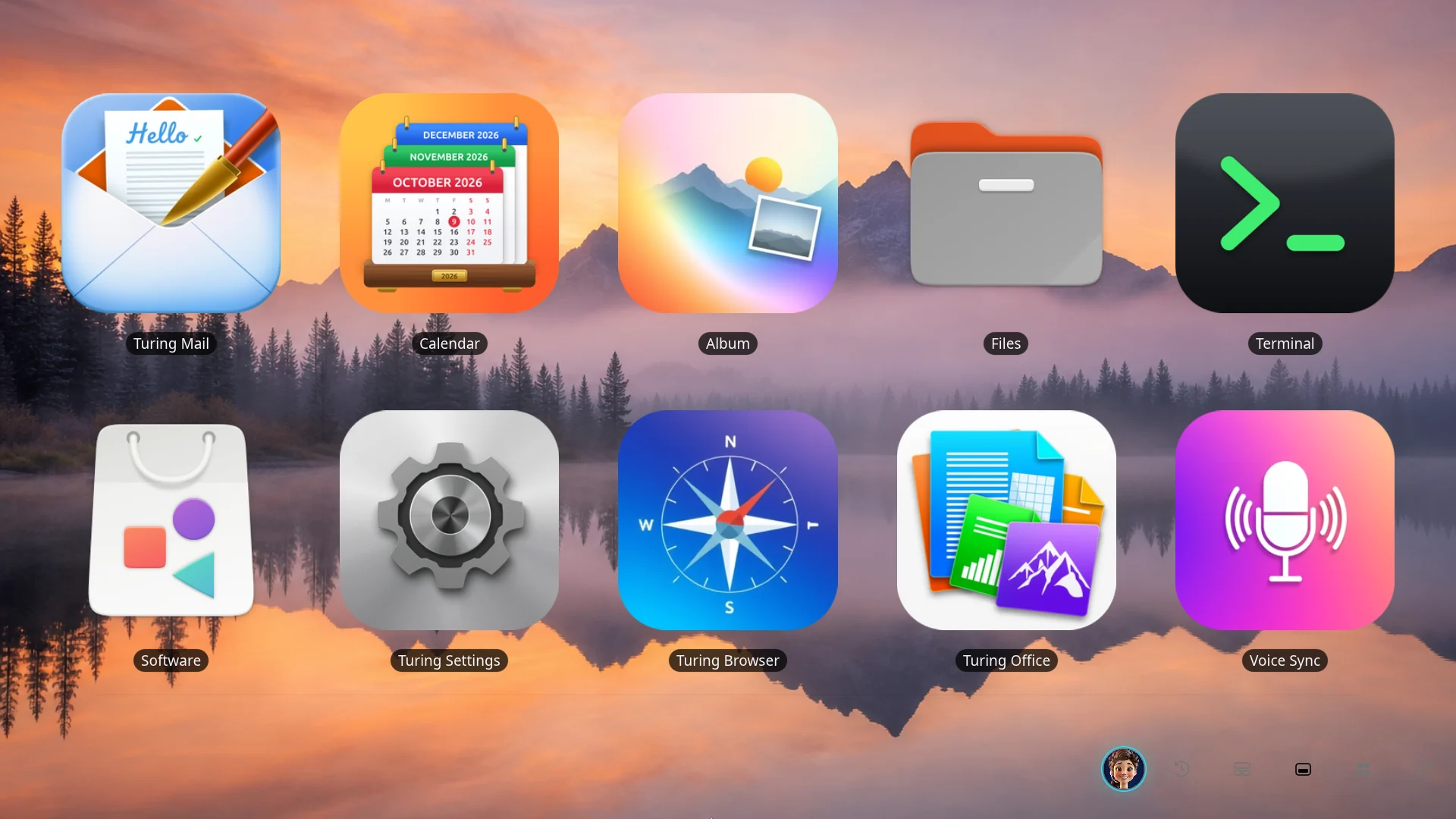
Press the Dock button beside the assistant, in the bottom-right corner, and the apps you keep to hand fill the screen: Turing Mail, Calendar, Album, Turing Browser, Turing Office and the rest. Open one and the Dock puts itself away again, so the desk stays yours.
5 / 22
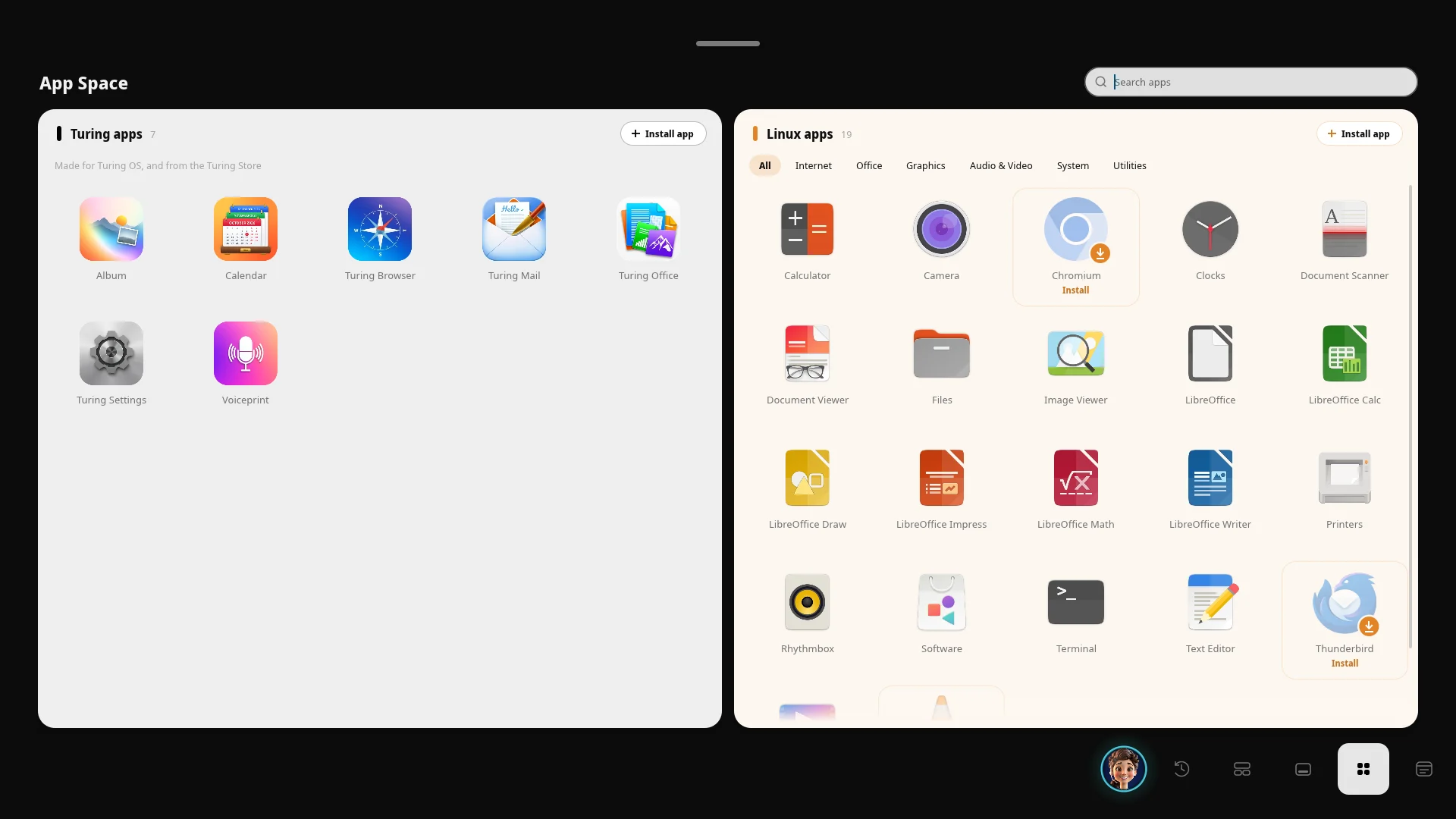
Every app on the computer in one place, opened from the corner of the screen: Turing’s own on the left, Linux apps on the right, sorted by kind, with a search box and a button to install more.
6 / 22
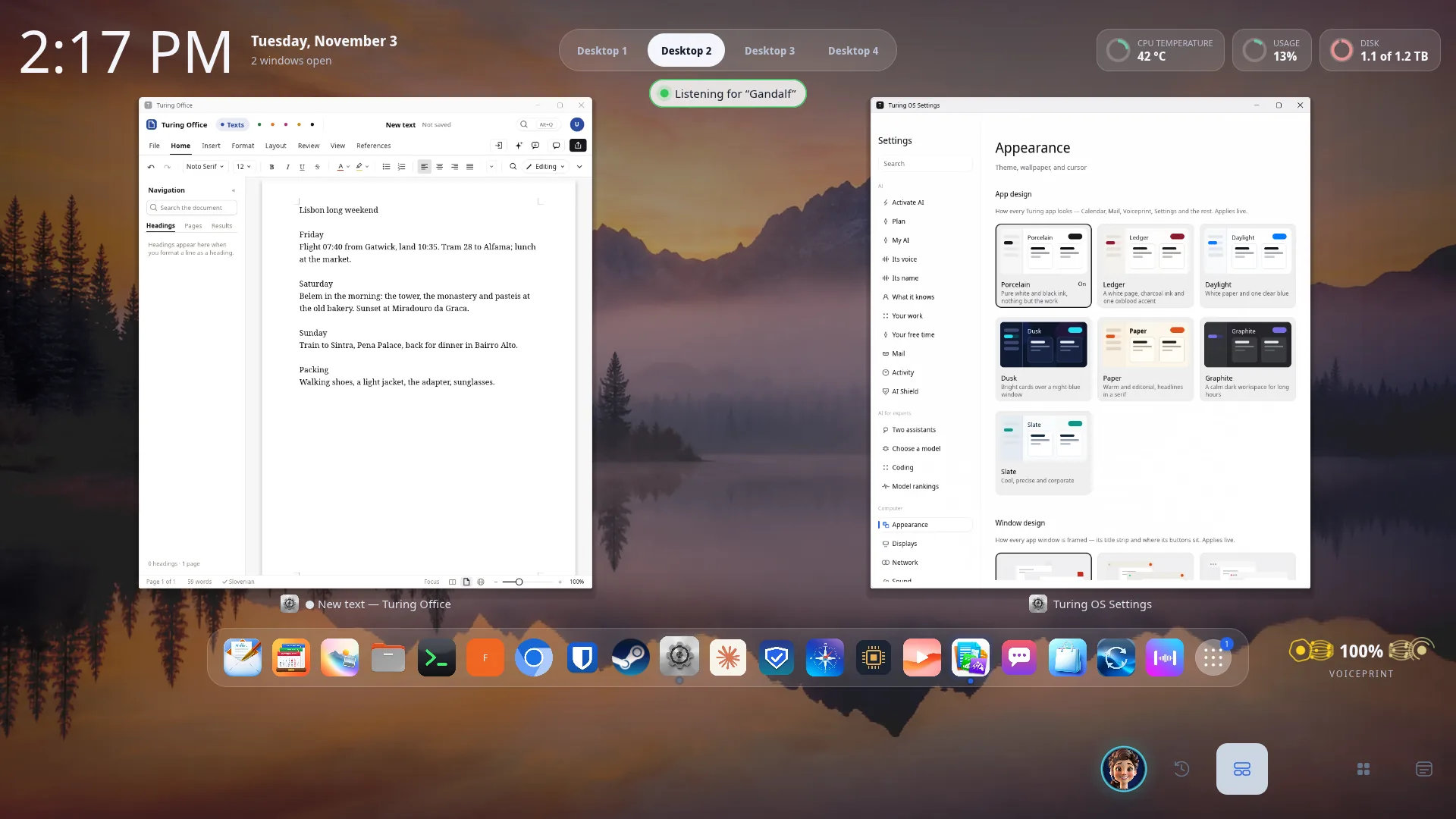
Push the pointer to the bottom of the screen, or press the Overview button in the corner, and every open window lays itself out in a grid: the time and what the computer is doing across the top, your apps in a bar below. A window you have put away waits on a shelf of its own, so nothing is lost.
7 / 22
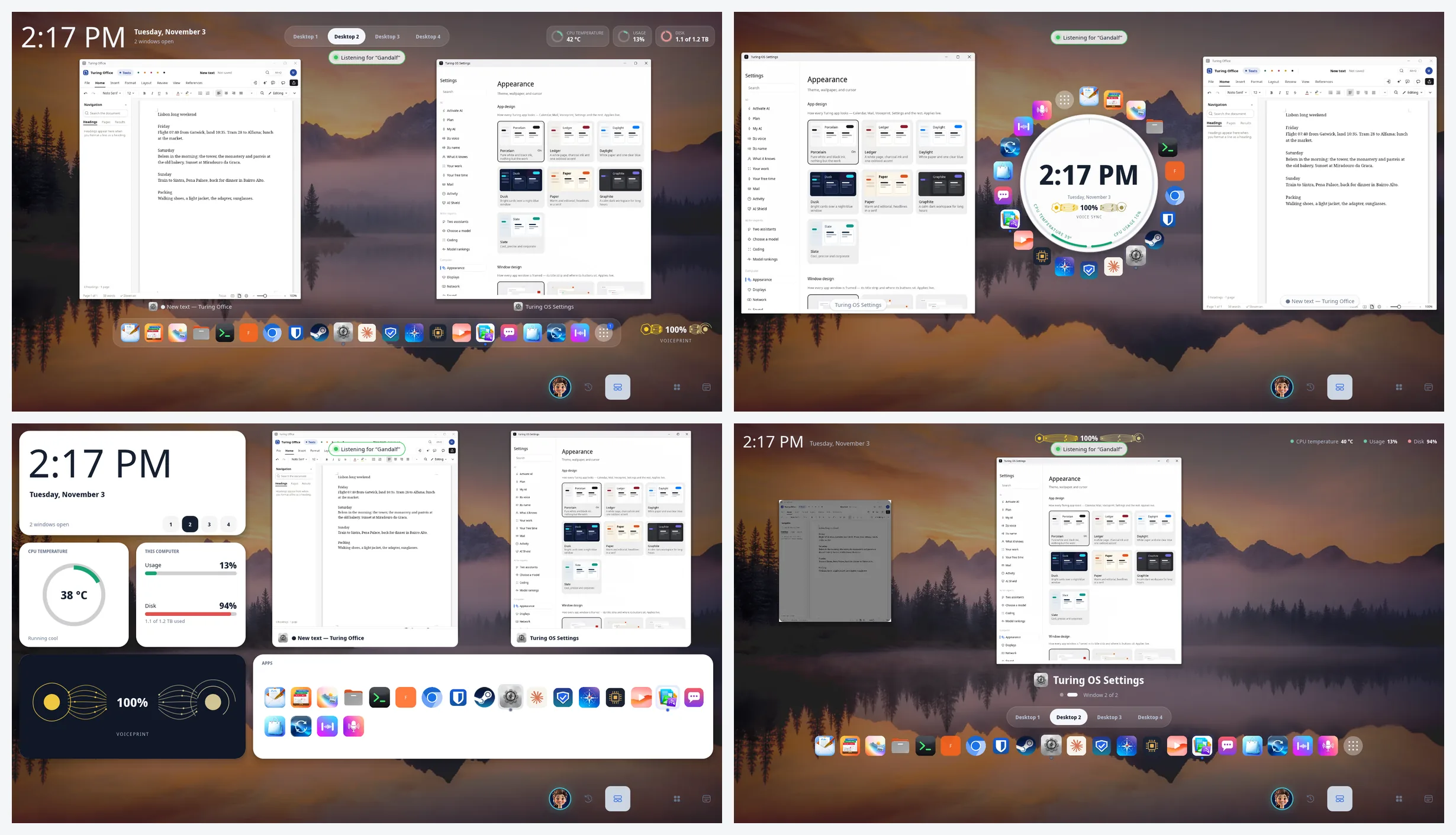
The same three windows in each of the Overview’s designs: Stage and Orbit above, Bento and Carousel below. Choose the one you like in Settings; it changes at once.
8 / 22
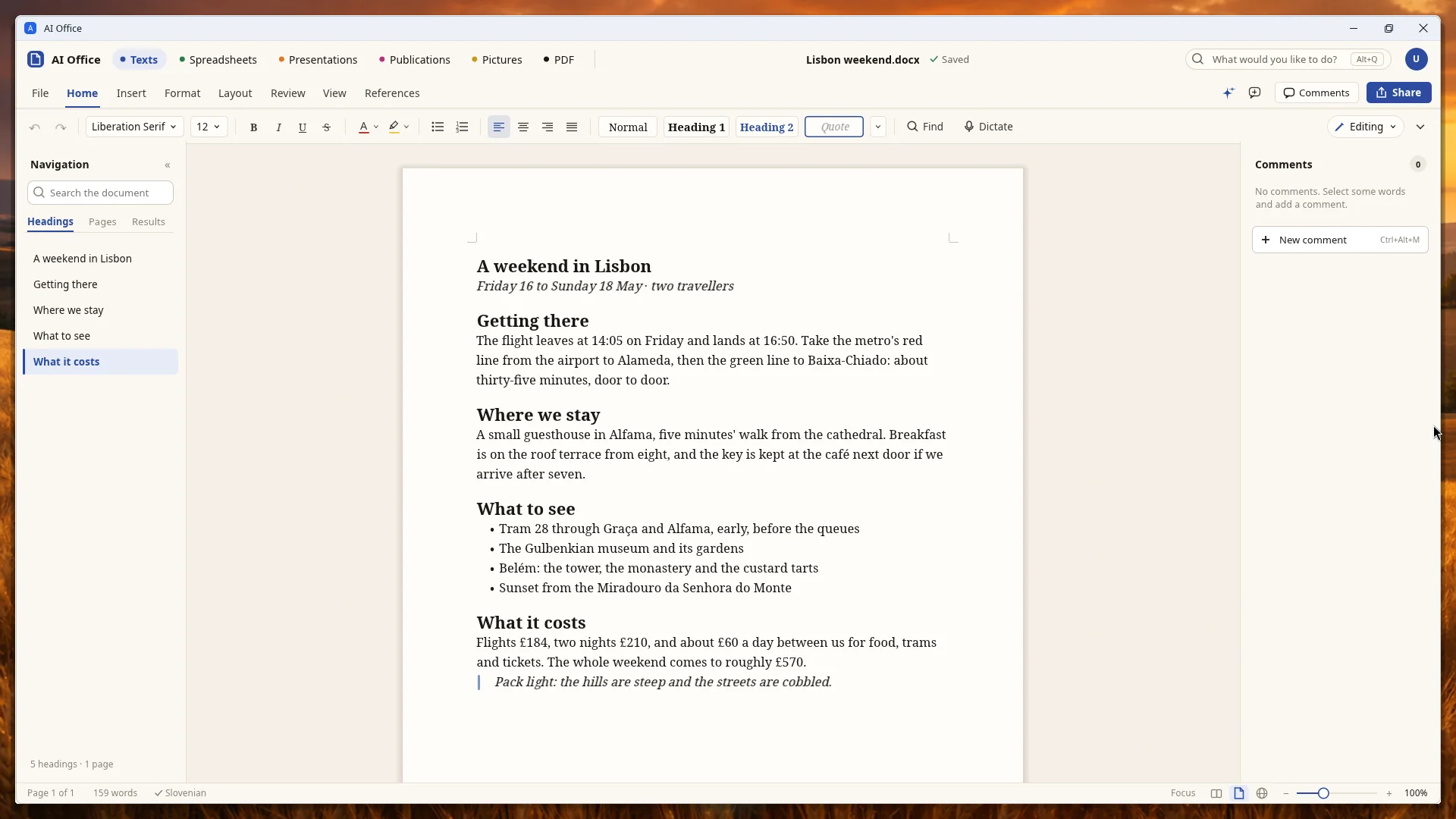
The word processor: headings down the left, comments on the right, and a travel plan in the middle. Every button here is a command the assistant can run, so you can ask for the change instead. Saves as Word, OpenDocument, RTF or PDF.
9 / 22
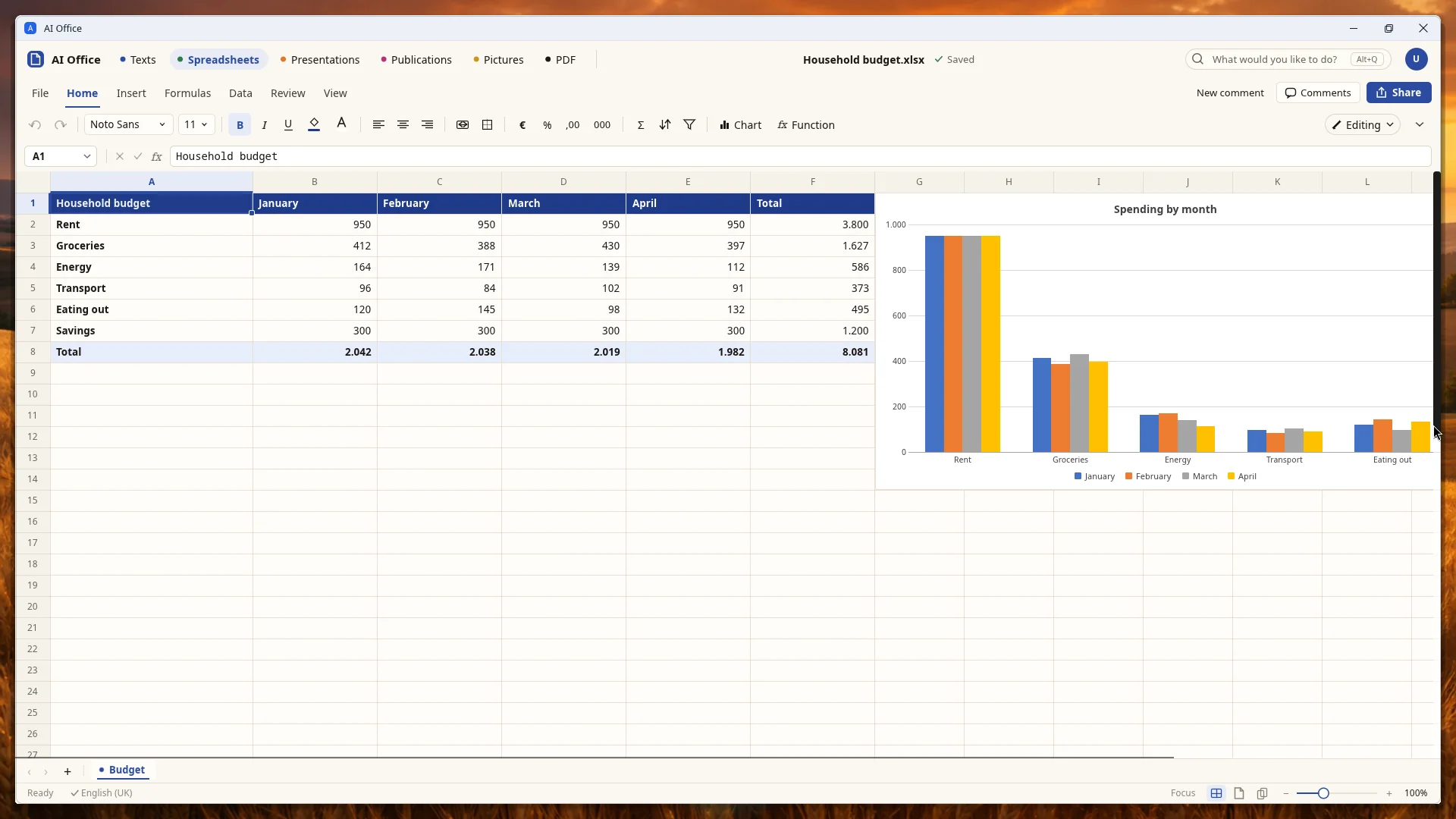
A household budget with its totals worked out by formulas and a chart drawn from the same cells. Opens and saves Excel and OpenDocument spreadsheets.
10 / 22
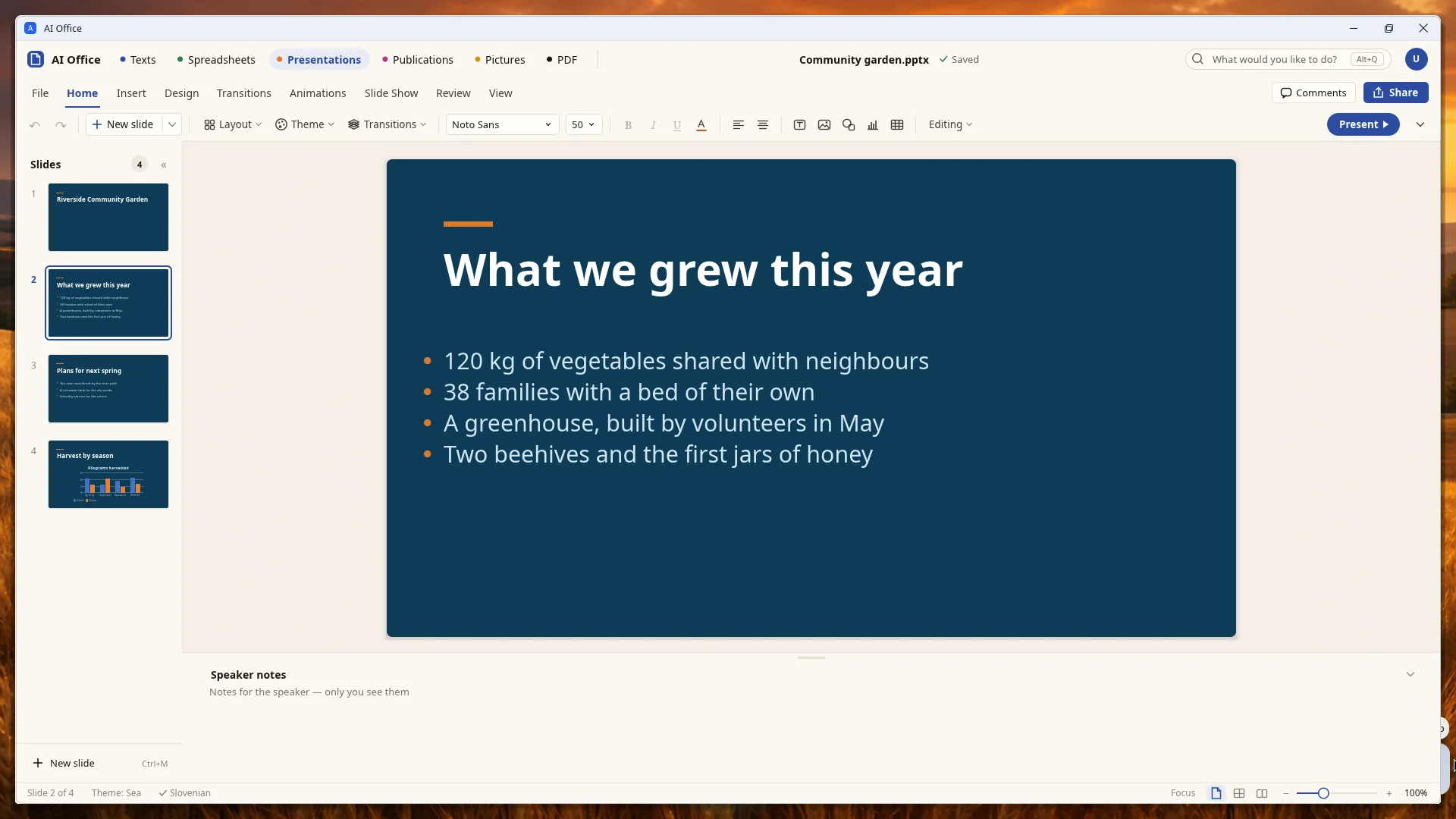
Slides down the left, the one you are working on in the middle, speaker notes underneath, and Present in the corner. Opens and saves PowerPoint files.
11 / 22
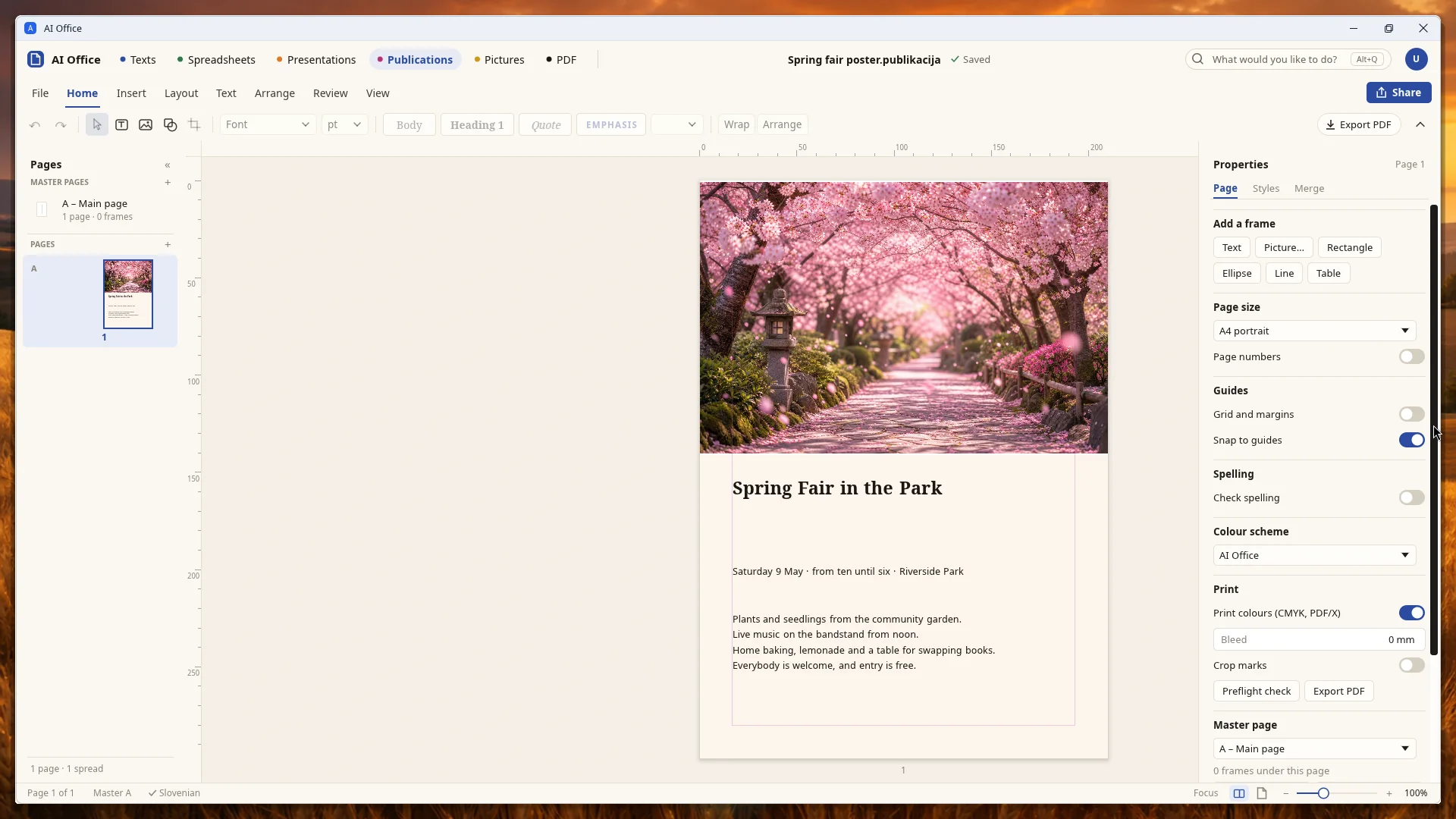
Pages laid out for print: a poster made of a picture frame and text frames, with page size, guides and print colors on the right.
12 / 22
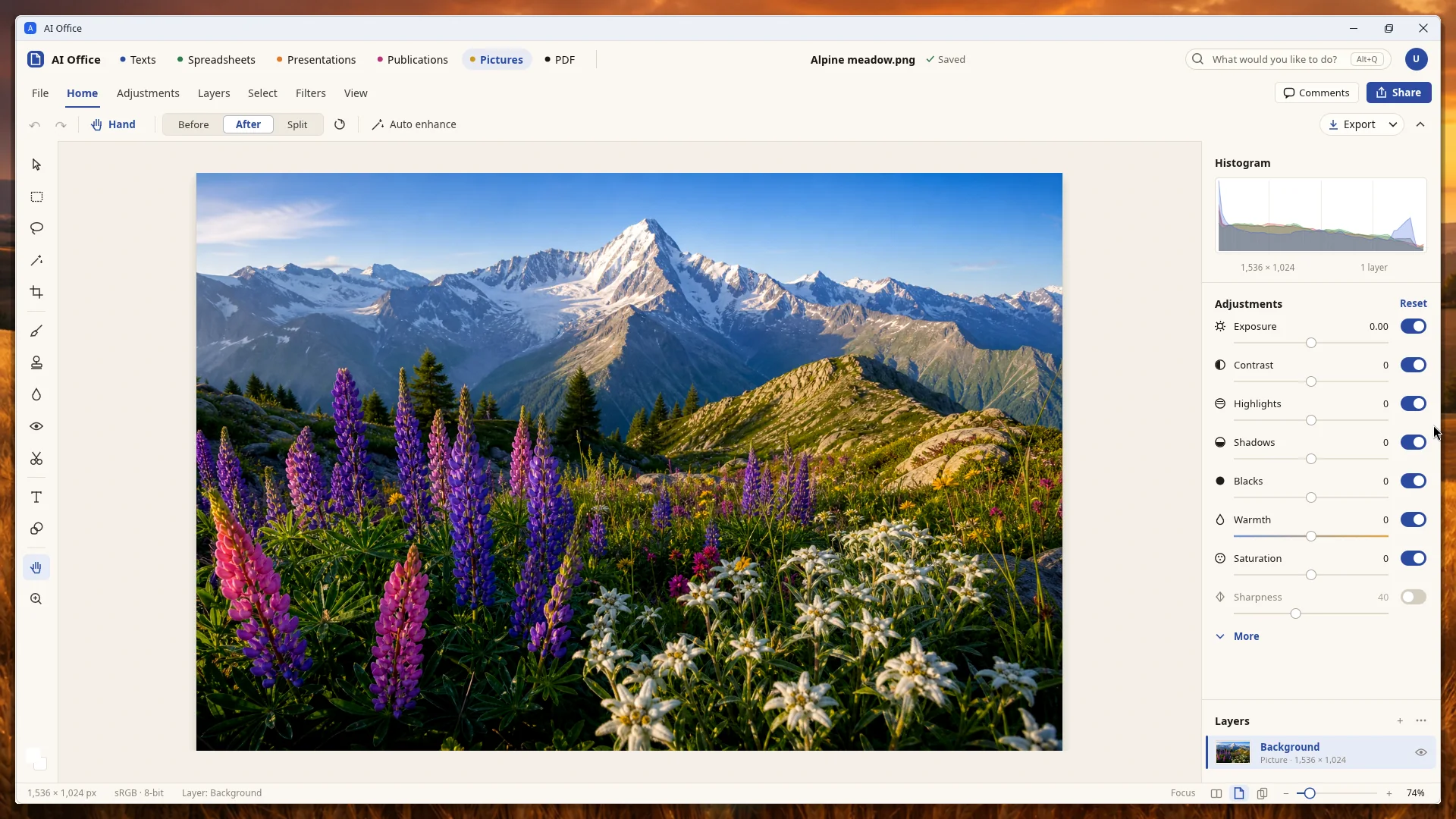
Edit a photograph with layers and adjustments — exposure, contrast, highlights, shadows, warmth — and compare before and after.
13 / 22
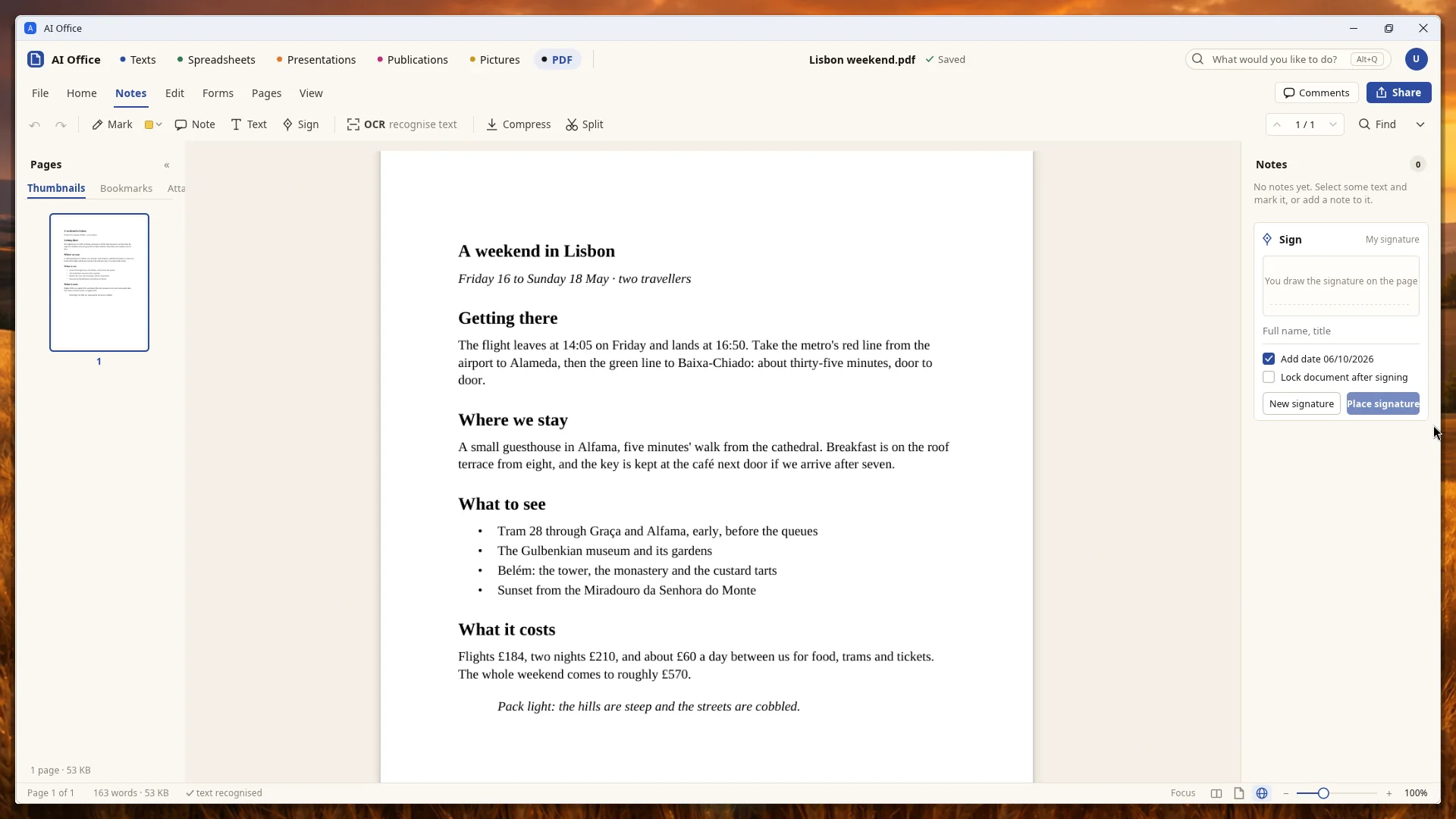
Open a PDF to mark it, add notes or text, sign it, recognize the words in a scan, or split and compress it.
14 / 22
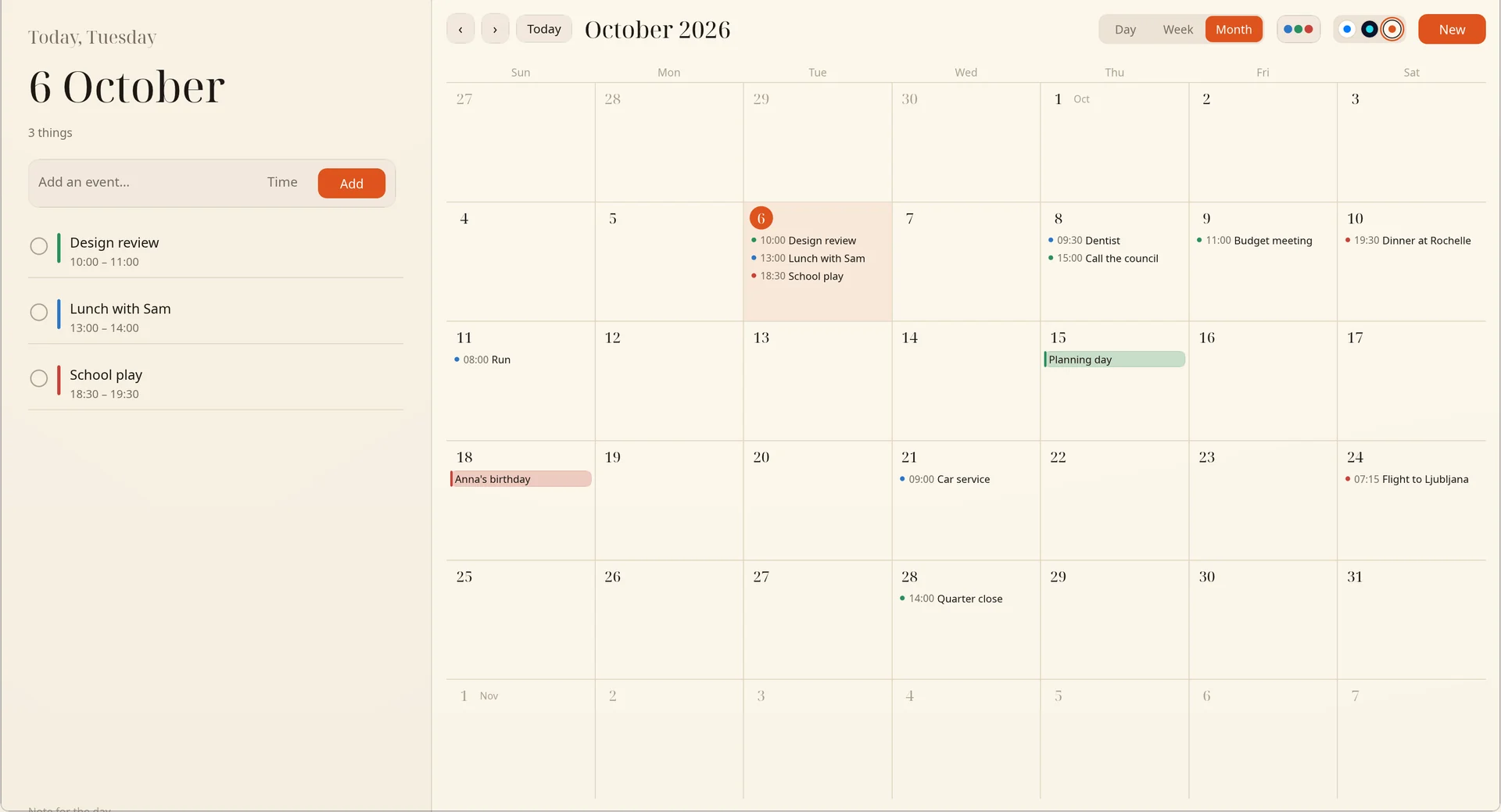
The Paper design: today’s date and agenda set like a printed page, with the month beside it in fine lines. There are two more, Daylight and Dusk. Ask the assistant what is on Thursday, or to move the dentist to Friday.
15 / 22
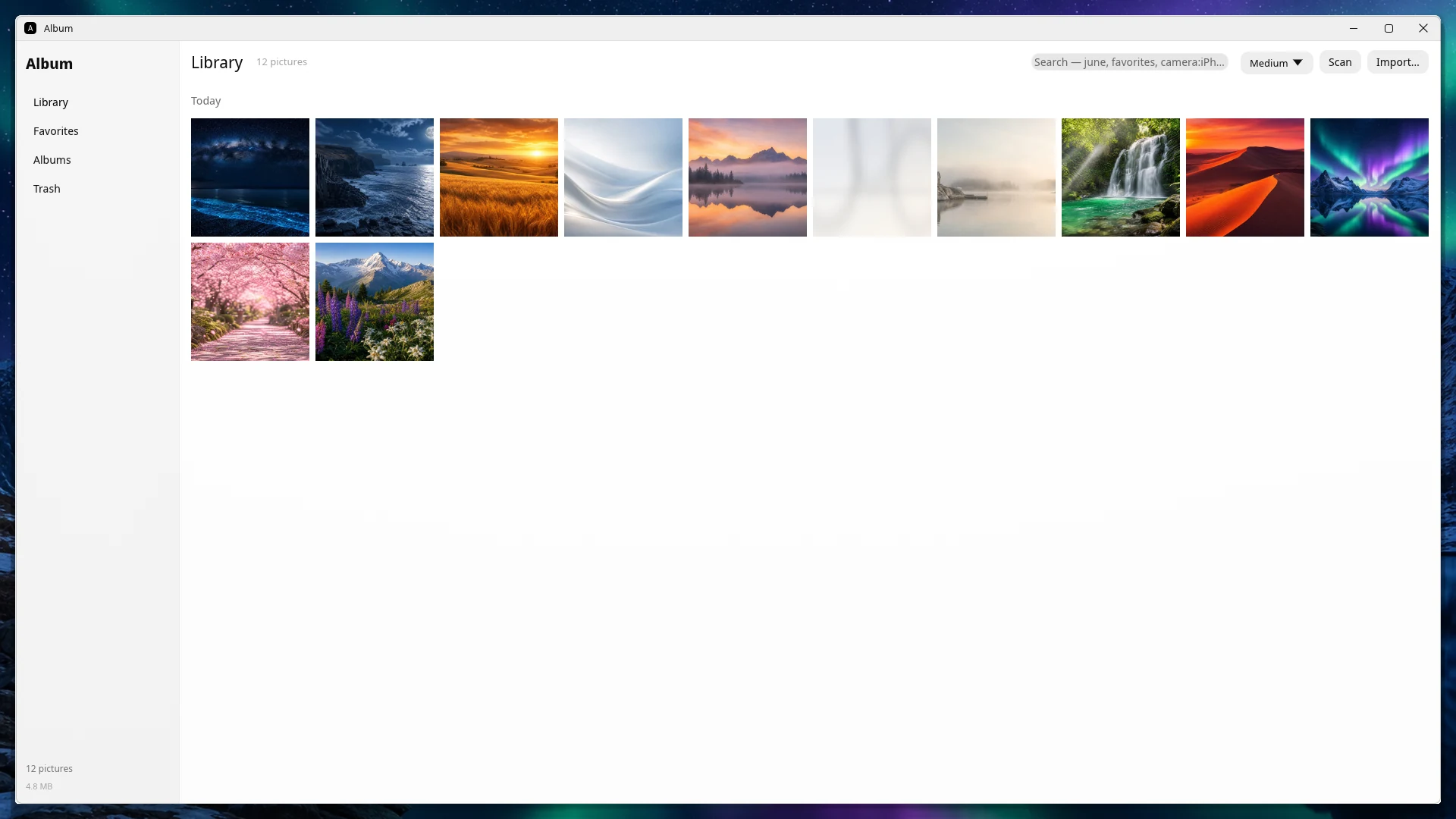
Your photos and albums. They stay on this computer and are never uploaded.
16 / 22
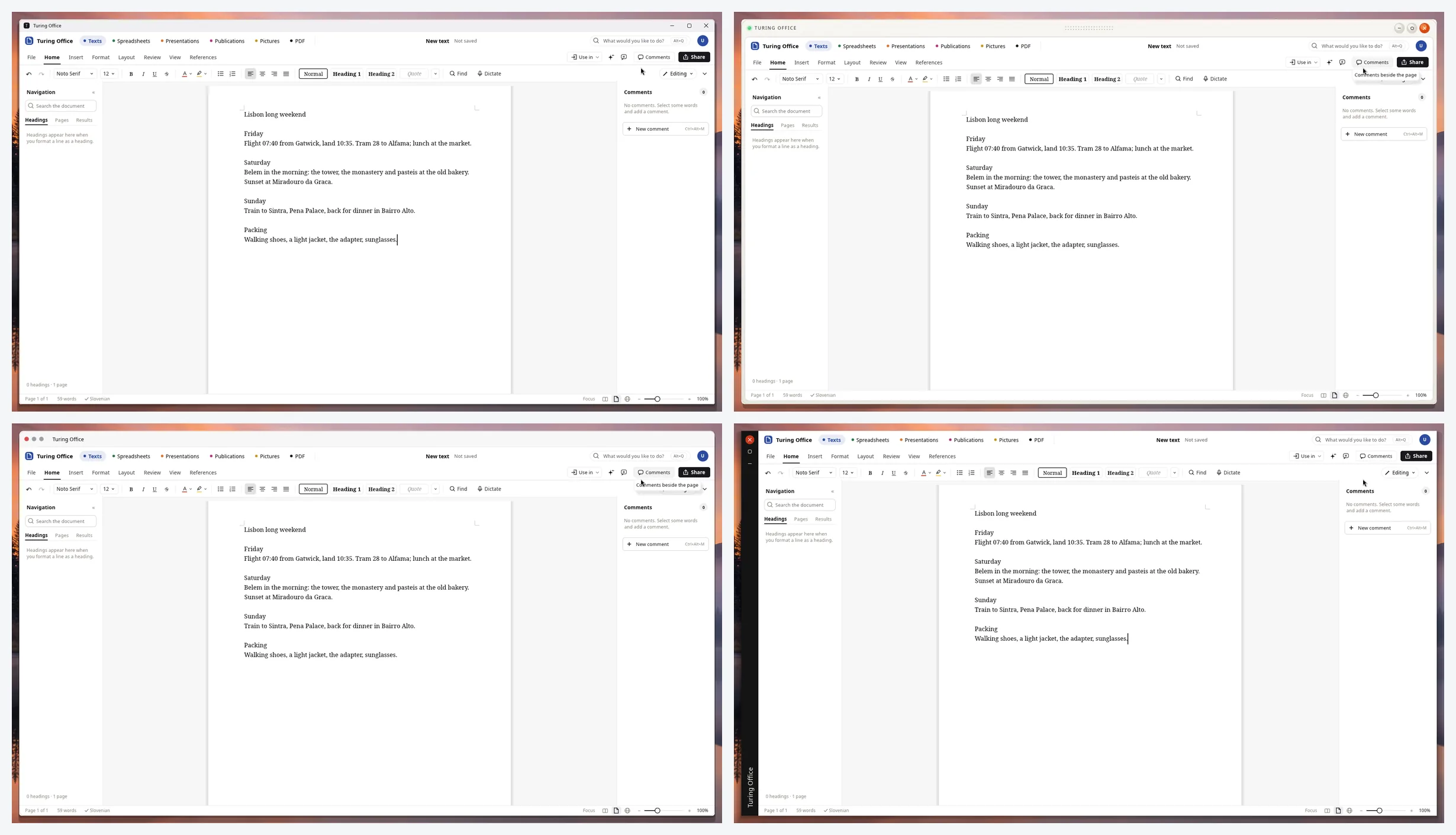
Every window can be framed the way you like it, and the change applies at once. Four of the seven, on the same travel plan in Turing Office: Classic and Instrument above, Unified and Folio below.
17 / 22
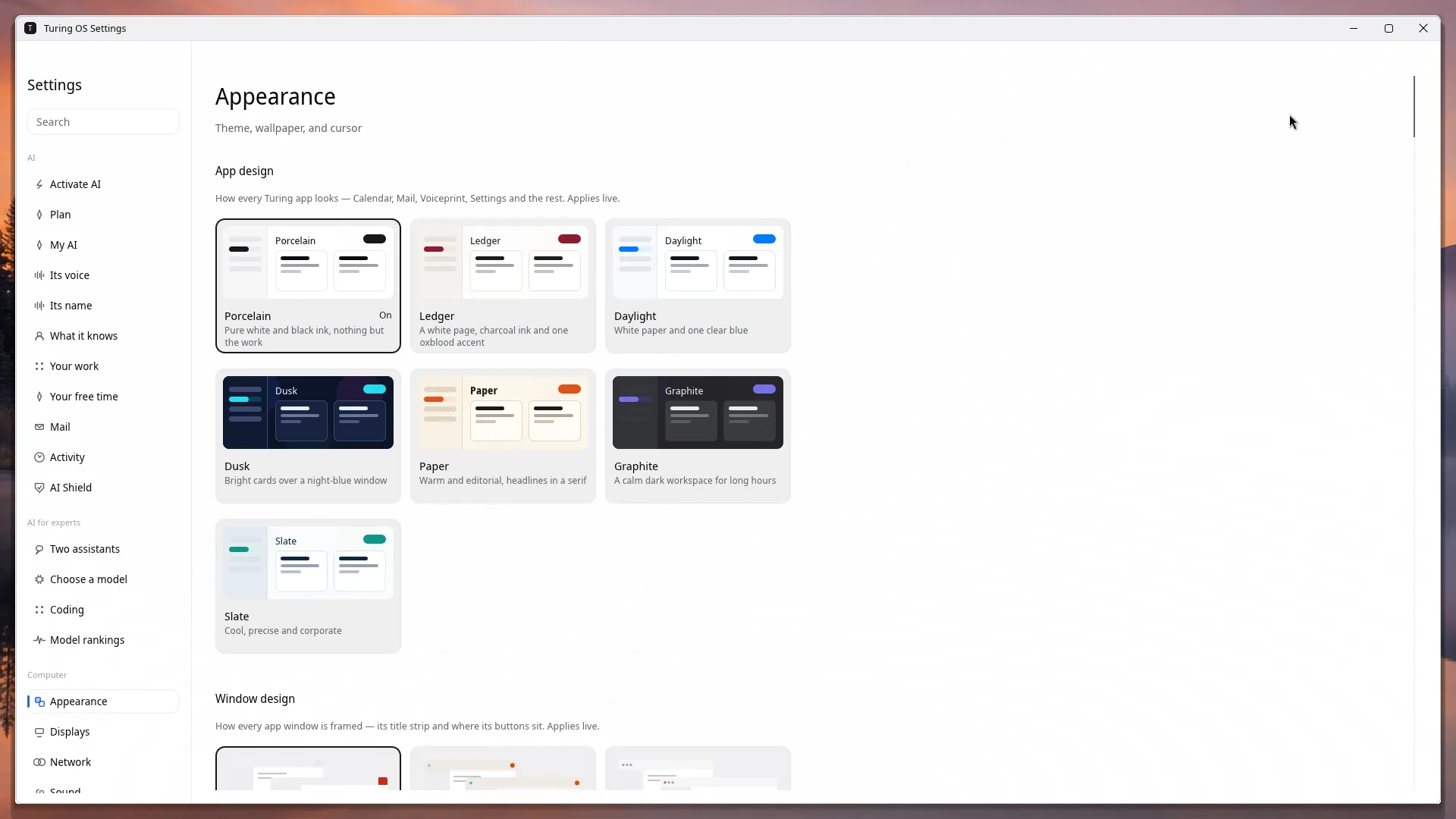
One design for every Turing app — Porcelain, Ledger, Daylight, Dusk, Paper, Graphite or Slate — and the window designs, the assistant’s orb, the theme, the wallpaper and the cursor, chosen in one place.
18 / 22
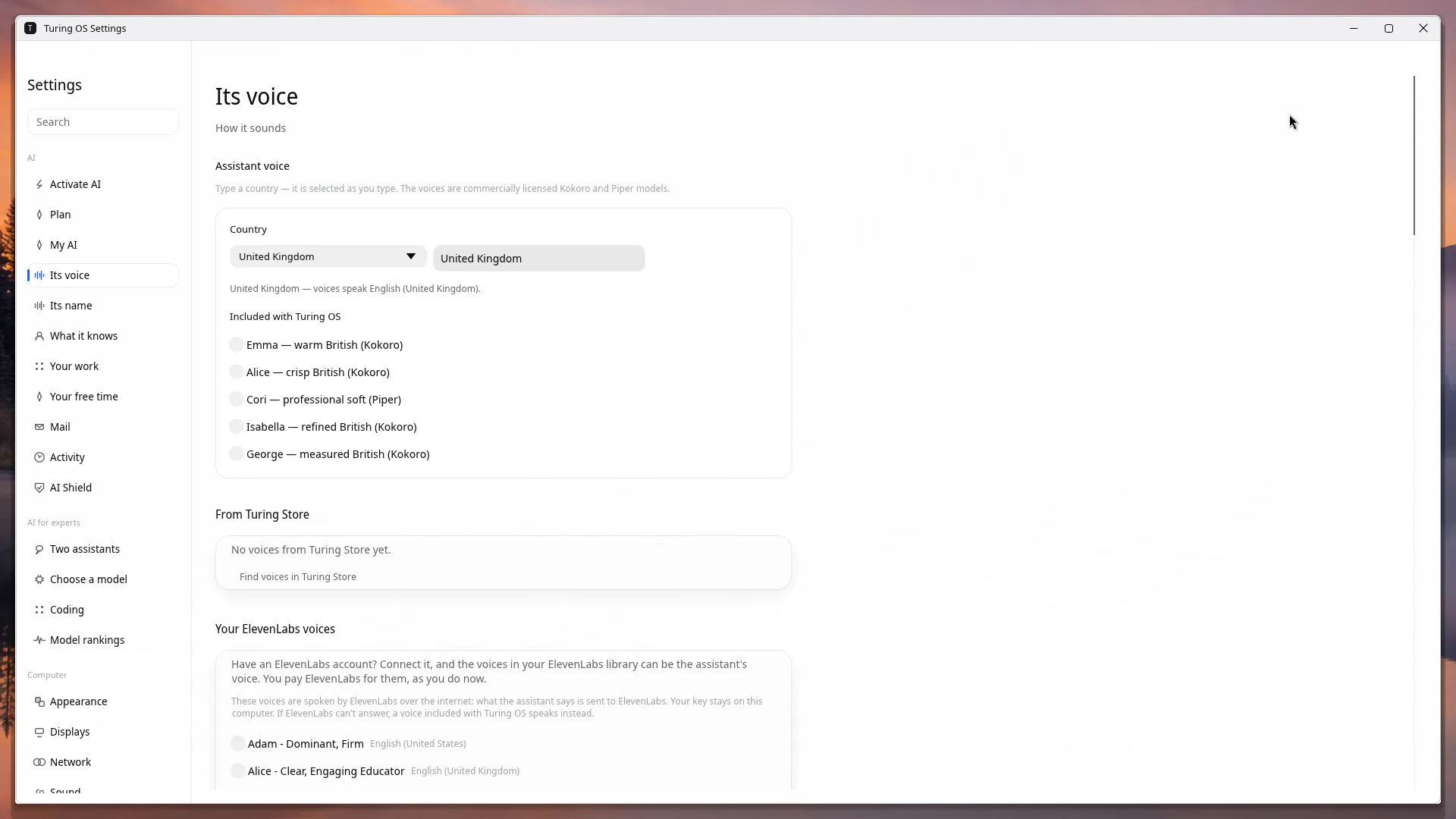
Choose a country and a voice: one included with the system, one from the Turing Store, or one from your own ElevenLabs account. The name it answers to is chosen on its own.
19 / 22
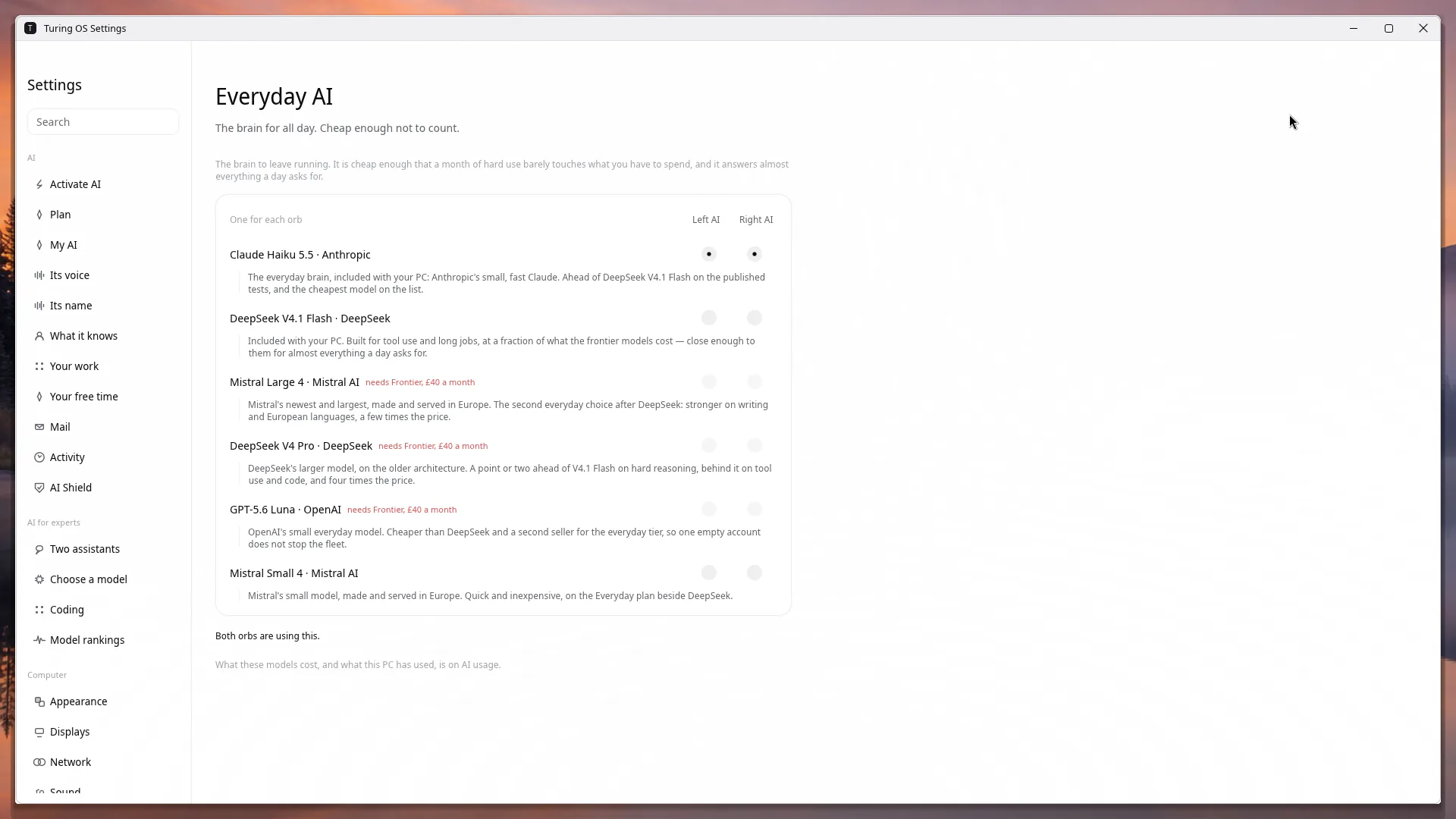
The model to leave running all day, chosen for each orb on the dock. Claude Haiku 5.5, DeepSeek V4.1 Flash and Mistral Small 4 come with the £7.99 plan; the others need Frontier, or your own Claude, ChatGPT or Google account.
20 / 22
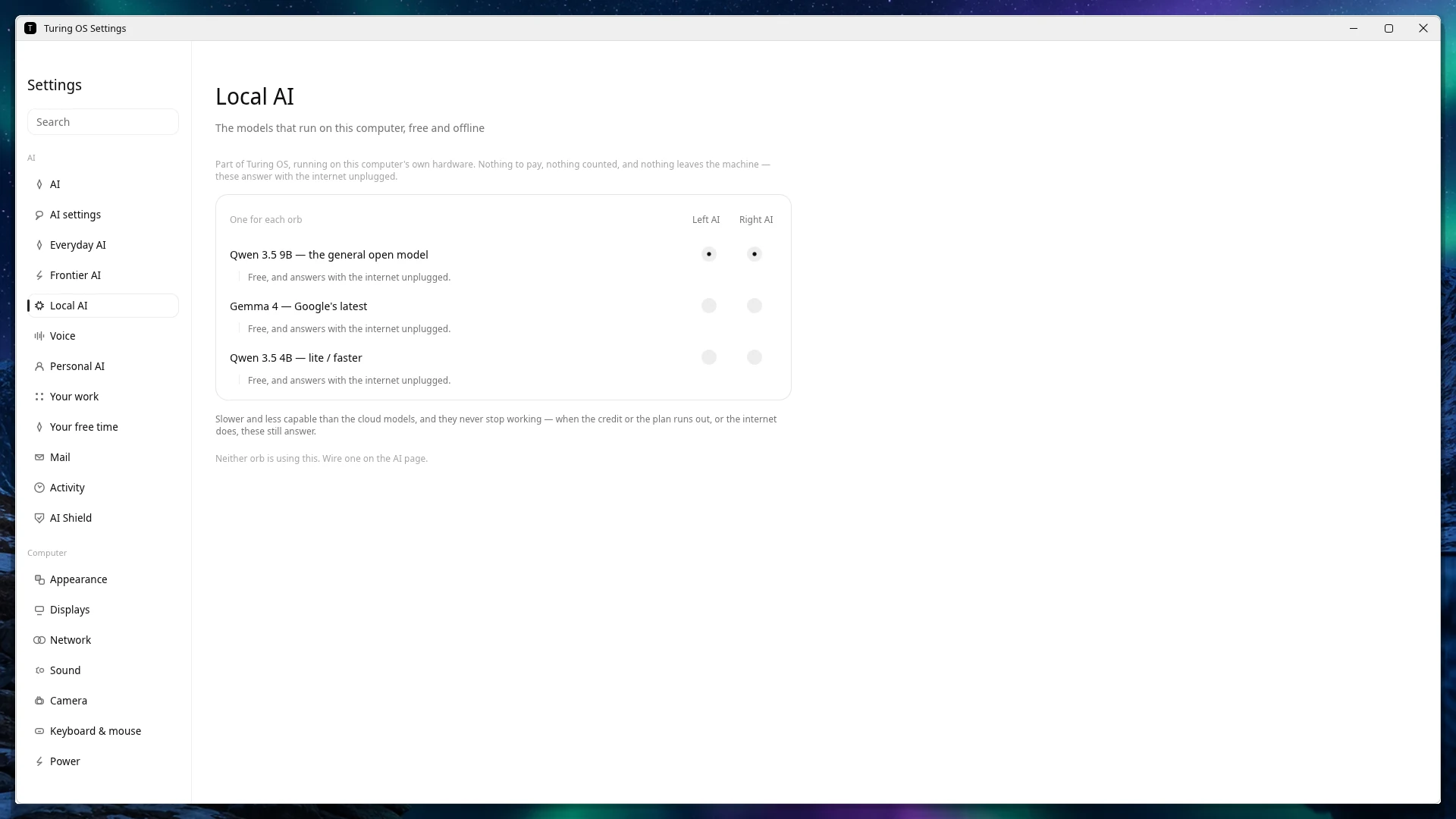
Models that run on your own computer: free, private, and they answer with the internet unplugged.
21 / 22
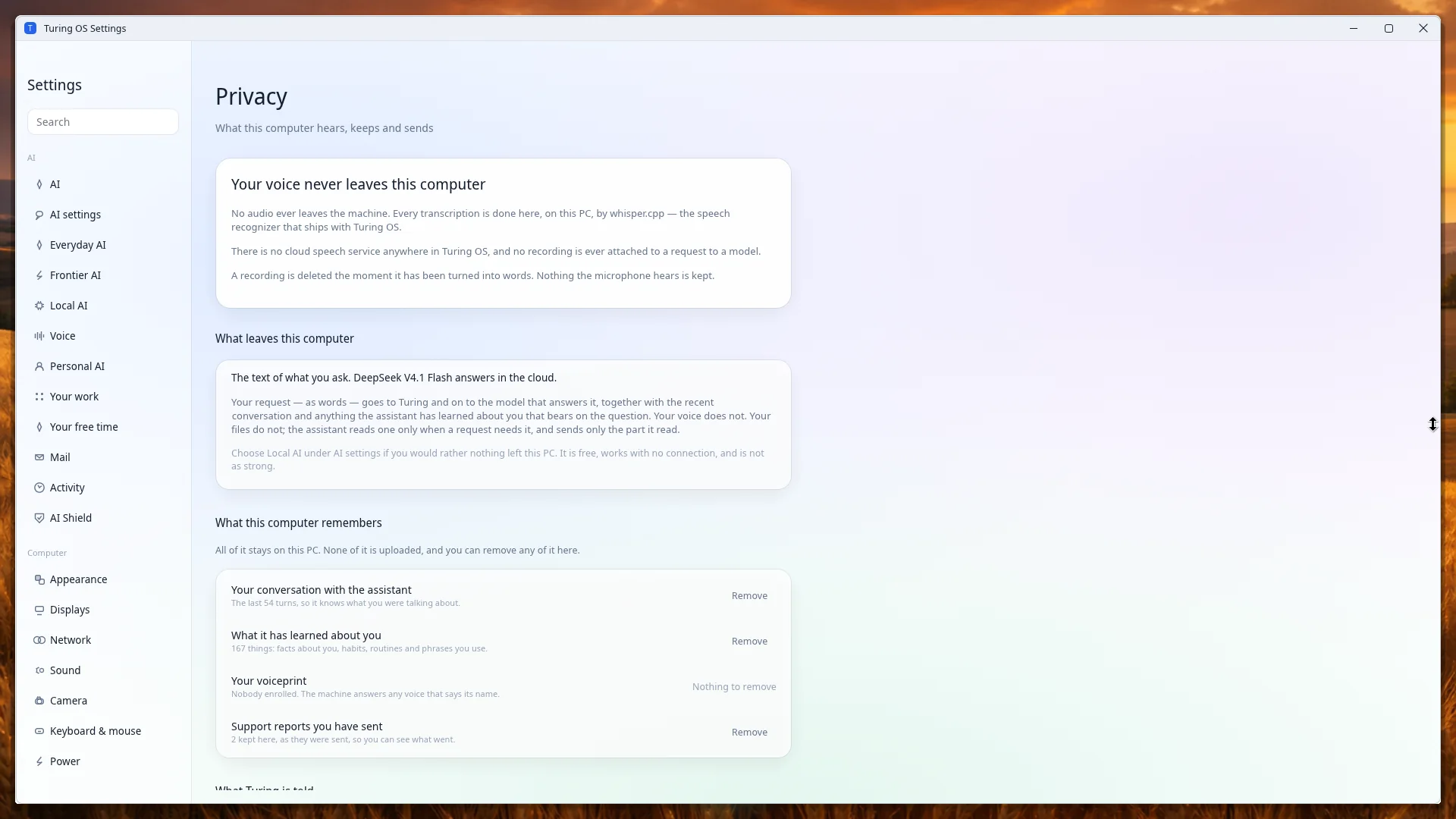
What this computer hears, keeps and sends, in plain words — and a Remove button beside everything it remembers.
22 / 22
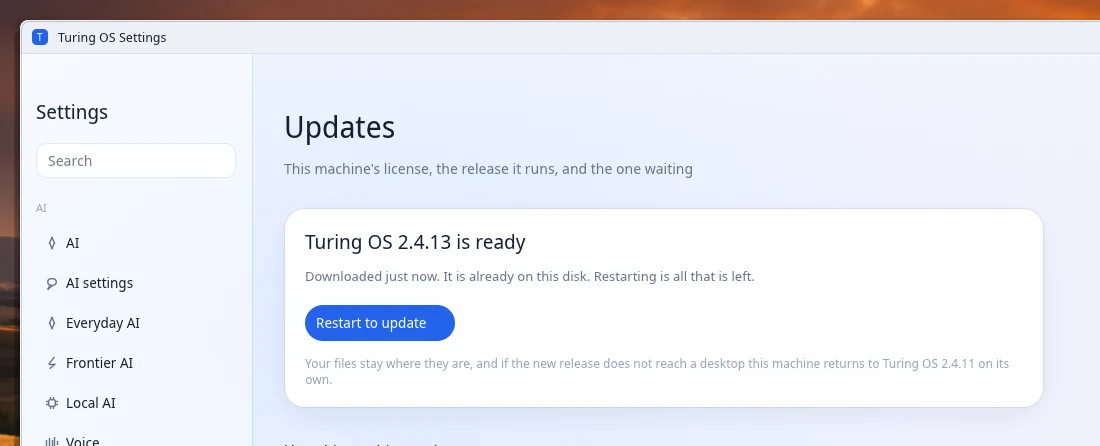
A new release comes every week, with improvements and security patches. The computer fetches it by itself, so the only thing left to you is when to restart. Your files stay where they are, and if a new release does not reach a desktop the computer goes back to the one before on its own.
Talking to it
“Hey Turing”
Or give it any name you like — name your assistant. It starts listening the moment it hears the name, and starts working as soon as you stop speaking.
Super key
Tap the Super key and speak — or tap it and just start typing, when you would rather not talk out loud. The orb on the dock works the same way. Where to find it.
Interrupt it
Say its name while it is working or talking and it stops to ask what you want to add, then carries on with the request as you have changed it.
It waits for you
Stop to think in the middle of a sentence and it waits. A pause is not the end of what you were saying.
It knows your voice
Voice Sync learns how you speak from ordinary use, with no training session to sit through, so it hears you better the longer you have it.
In your language
Choose a voice and the computer speaks and listens in that voice’s language. Hear the voices.
It sits in the bottom row of almost every PC keyboard, between Ctrl and Alt, with four little squares printed on it. On Turing AI OS it is the key you talk to the assistant with. On a Mac keyboard it is the ⌘ Command key.
Held down with another key it is still a shortcut key, as it always was — only a tap on its own opens the microphone.
Press play. Every voice runs on the machine, with no connection needed. The voice you choose also sets the language it listens and replies in.
warm British
“Hello. This is Emma, a warm British voice for Turing AI OS.”
crisp British
“Hello. This is Alice, a crisp British voice for Turing AI OS.”
refined British
“Hello. This is Isabella, a refined British voice for Turing AI OS.”
measured British
“Hello. This is George, a measured British voice for Turing AI OS.”
professional soft
“Hello. This is Cori, a professional soft voice for Turing AI OS.”
profesionalni studio
“Živjo. Tukaj je Artur, profesionalni studijski glas za Turing AI OS.”
profesionalni jasen
“Dobro jutro. Tukaj je Artur, jasen profesionalni glas za Turing AI OS.”
profesionalni topel
“Lep pozdrav. Tukaj je Artur, topel profesionalni glas za Turing AI OS.”
profesionalni živahen
“Živjo. Tukaj je Artur, živahen profesionalni glas za Turing AI OS.”
profesionalni umirjen
“Dober dan. Tukaj je Artur, umirjen profesionalni glas za Turing AI OS.”
voz profesional
“Hola. Soy Dora, una voz profesional para Turing AI OS.”
voz clara
“Hola. Soy Alex, una voz clara para Turing AI OS.”
voz grave
“Hola. Soy Santa, una voz grave para Turing AI OS.”
voix Kokoro
“Bonjour. Je suis Siwis, une voix professionnelle pour Turing AI OS.”
professionnelle chaude
“Bonjour. Voici Camille, une voix professionnelle chaude pour Turing AI OS.”
professionnel clair
“Bonjour. Voici Bastien, une voix professionnelle claire pour Turing AI OS.”
professionnelle douce
“Bonjour. Voici Colette, une voix professionnelle douce pour Turing AI OS.”
professionnel posé
“Bonjour. Voici Damien, une voix professionnelle posée pour Turing AI OS.”
professionnelle vive
“Bonjour. Voici Élise, une voix professionnelle vive pour Turing AI OS.”
professionell hell
“Guten Tag. Das ist Anna, eine helle professionelle Stimme für Turing AI OS.”
professionell tief
“Guten Tag. Das ist Bernd, eine tiefe professionelle Stimme für Turing AI OS.”
professionell warm
“Guten Tag. Das ist Clara, eine warme professionelle Stimme für Turing AI OS.”
professionell ruhig
“Guten Tag. Das ist Dieter, eine ruhige professionelle Stimme für Turing AI OS.”
professionell klar
“Guten Tag. Das ist Elke, eine klare professionelle Stimme für Turing AI OS.”
professioneel helder
“Hallo. Dit is Saskia, een professionele heldere stem voor Turing AI OS.”
professioneel diep
“Hallo. Dit is Bram, een professionele diepe stem voor Turing AI OS.”
professioneel warm
“Hallo. Dit is Chantal, een professionele warme stem voor Turing AI OS.”
professioneel rustig
“Hallo. Dit is Daan, een professionele rustige stem voor Turing AI OS.”
professioneel zacht
“Hallo. Dit is RDH, een professionele zachte stem voor Turing AI OS.”
voce naturale
“Ciao. Sono Sara, una voce professionale per Turing AI OS.”
voce chiara
“Ciao. Sono Nicola, una voce chiara per Turing AI OS.”
warm natural
“Hello. This is Heart, a warm natural voice for Turing AI OS.”
bright expressive
“Hello. This is Bella, a bright expressive voice for Turing AI OS.”
professional clear
“Hello. This is Sarah, a professional clear voice for Turing AI OS.”
steady grounded
“Hello. This is Michael, a steady grounded voice for Turing AI OS.”
deep resonant
“Hello. This is Fenrir, a deep resonant voice for Turing AI OS.”
warm conversational
“Hello. This is Nicole, a warm conversational voice for Turing AI OS.”
professional clear
“Hello. This is Lyra, a professional clear voice for Turing AI OS.”
professional warm
“Hello. This is Kristin, a professional warm voice for Turing AI OS.”
professional deep
“Hello. This is Norman, a professional deep voice for Turing AI OS.”
professional steady
“Hello. This is John, a professional steady voice for Turing AI OS.”
professional narrative
“Hello. This is Story, a professional narrative voice for Turing AI OS.”
voz natural
“Olá. Eu sou a Dora, uma voz profissional para o Turing AI OS.”
voz clara
“Olá. Eu sou o Alex, uma voz clara para o Turing AI OS.”
स्पष्ट हिंदी
“नमस्ते। मैं अल्फा हूँ, ट्यूरिंग ओएस के लिए एक पेशेवर आवाज़।”
स्थिर हिंदी
“नमस्ते। मैं ओमेगा हूँ, ट्यूरिंग ओएस के लिए एक स्थिर आवाज़।”
自然な声
“こんにちは。チューリングOSの声、アルファです。”
落ち着いた声
“こんにちは。チューリングOSの声、クモです。”
沉稳男声
“你好。我是云希,图灵操作系统的专业声音。”
The voices are open models, several of which ask for credit — who made them, and under what license, is under Licenses in the footer.
The virtual assistant
The industry calls it a bot, or an agent: an AI that does not only answer, but goes and does the thing — opens the page, compares the offers, writes the letter. On Turing AI OS it is part of the system. It works inside the apps, and on the web in a browser page of its own that you can watch, and it stops at the one press that is yours.
In your own words, out loud or typed: the result you want, not the steps to get there.
It works out the steps and takes them: searches the real sites, reads what they say, fills in what it knows about you, and uses the apps directly through their API.
It brings you the result ready to go. Sending, paying and signing are yours: it never does them for you.
Shopping
“Order the usual groceries for Saturday.”
It shops the real online shops: finds each thing, compares prices and ratings, and fills the basket. The checkout waits for you.
Property search
“Find me a two-bedroom flat for sale near the park, under three hundred thousand.”
It opens the property site you choose on exactly your search — the area, the bedrooms, the price — with its listings on your screen. The sites do not let robots read their listings, so the choosing is yours.
Official emails
“Write to the council about the broken street light outside.”
It finds the right address, writes a clear, polite letter in Turing Mail with the details that matter, and leaves it open for you to read and send.
Documents
“Turn my notes into a proper letter and save it as a PDF.”
It writes the document in AI Office — headings, layout and all — talks it through with you until it is right, and saves it in the format you need.
It remembers what helps — your address, your sizes, the shops you use — on this computer, and Settings › Personal AI shows everything it has learned. Shops and sites named here are examples; Turing is not affiliated with them.
Name your assistant
Your assistant answers to the name you give it, not to one we chose. Type a name and the computer learns to hear it, on the machine itself. The voice is a separate choice, so the name and the voice can be anything you like together.
In Settings › Voice, or when you set the computer up. It tells you at once whether the name is easy to hear in a room, and why.
It takes about an hour, in the background, without slowing you down. Until it is learned the assistant keeps answering to the name it has.
One of the voices included with the system, or one from your own ElevenLabs account.
For example
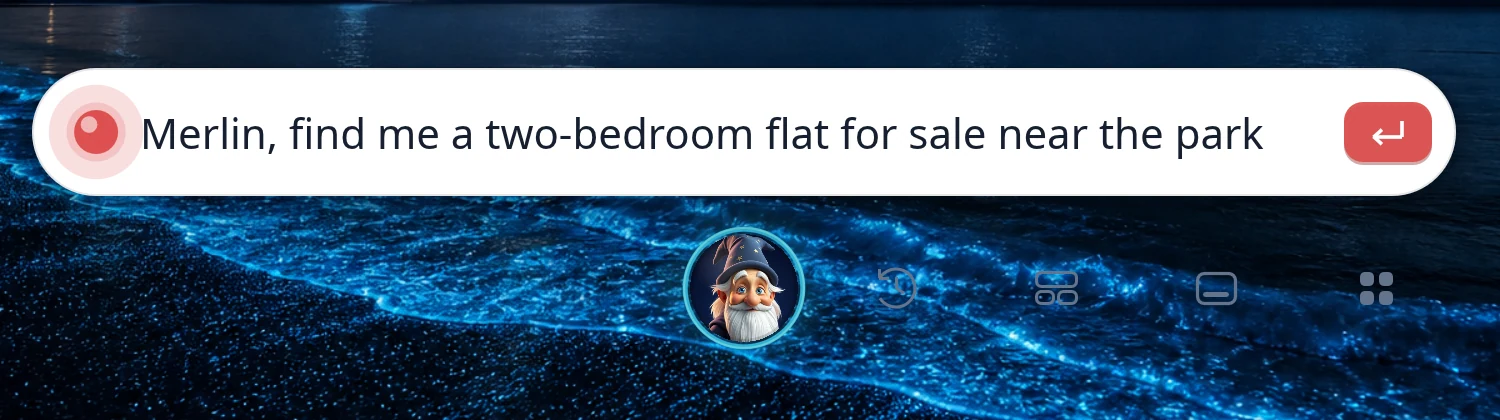
“Merlin, find me a two-bedroom flat for sale near the park.”
Name it Merlin and give it the Old Wizard voice from the ElevenLabs Voice Library, and an old wizard answers whenever you call — and opens the property site on exactly your search.
Whatever its name, face and voice, it is the same assistant: it does everything the virtual assistant does, and the final press is always yours.
Connect your personal ElevenLabs account in Settings › Voice, once, with its API key, and every voice in your ElevenLabs library — and thousands in their Voice Library: storytellers, cartoon characters, monsters, every accent — can be your assistant’s voice. You pay ElevenLabs directly, on your own plan; Turing charges nothing for it.
The key stays on your computer and is sent nowhere but ElevenLabs. An ElevenLabs voice is spoken in their cloud, so what the assistant says to you is sent to ElevenLabs to be spoken; the included voices never leave the machine. If ElevenLabs cannot answer, an included voice of the same language speaks instead. ElevenLabs is a trade mark of its owner; Turing is not affiliated with it.
Turing Brain
A model on its own can only write. Turing Brain is what stands between it and your computer — a harness, or a robot, as some people call it. It is the same whichever model you choose, and it is what does the work.
Reflexes
Switching desktop, setting a timer, adding up a sum: it knows these the moment you have said them, and does them without waiting for a model to think.
Meaning analysis
There are no commands to learn. It works out what a sentence means however you put it, in the language your voice speaks.
General intelligence
Anything a reflex does not catch goes to the model you chose. It plans the steps and uses the apps, and it is checked: a reply that claims something no action did is sent back.
Personalization
Your habits, your corrections and what you have told it are kept on this computer and handed to whichever model answers. They are yours: Settings shows them and deletes them.
Voice Sync
It gets better at hearing you from ordinary use, and it asks before it learns anybody else’s voice.
The web
It reads the web for an answer, fills a basket at a shop, and builds and looks after a website on the builder you choose. Some shops do not allow assistants; it tells you so and leaves them alone.
What you can ask
Ordinary requests to a Turing machine: what it does with each, and what it says back.
“Put AI Office on the left and my calendar on the right.”
Puts each window on its half of the screen you are looking at.
It says: “AI Office on the left, calendar on the right.”
“What have I got on Thursday?”
Reads Thursday out of your calendar.
It says: “Stand-up at nine, then your flight to Lisbon at two.”
“Turn the Lisbon notes into a document and save it as a PDF.”
Reads your notes, writes them up in AI Office with headings, and exports the PDF.
It says: “Done. It’s in Documents, as Lisbon weekend.”
“Move the dentist to Friday at ten.”
Finds the appointment in your calendar and moves it.
It says: “The dentist is now Friday at ten.”
“Find me a kettle under forty pounds.”
Asks real shops, reads the prices and ratings, and puts the options on screen.
It says: “Two under forty. The Bosch at 39.99 has the better rating. They’re on your screen.”
“Reply to Anna and say Saturday works.”
Writes the reply in Turing Mail and leaves it open for you. It never sends a letter itself.
It says: “The reply’s ready in Turing Mail. Read it and press Send.”
“Install Spotify.”
Installs it from the Turing Store and tells you where it comes from.
It says: “Downloading Spotify now. It comes from Flathub, made by Spotify AB.”
“Every weekday at eight, tell me the weather and my first meeting.”
Sets up a routine that runs on its own.
It says: “Every weekday at eight. I’ll start tomorrow.”
“Undo that.”
Everything it does is listed in Activity, and what can be undone, is.
It says: “Undone. The dentist is back where it was.”
“Set a timer for twenty minutes.”
Sets it and speaks up when it’s due.
It says: “Timer set for twenty minutes.”
“Show me the photos from the beach.”
Finds them in Album and opens them.
It says: “Here are your two beach photos, in Album.”
“Remember this layout as work.”
Remembers where every window is, so you can ask for “work” later.
It says: “Layout saved as work.”
AI Shield
An assistant that can act can also act wrongly. AI Shield is the part of Turing Brain that looks at everything the assistant does, and holds it to a short list of promises.
Signing in to an account, submitting a form on a website and adding a mail account still need your password — in a box the system draws itself, which the AI cannot fill in. If nobody types it, nothing leaves the computer.
Privacy
In the box
Each one is ours, and each gives the assistant its own way in — it writes in AI Office and books in Calendar directly, rather than pretending to click.
Yes, a full office suite — and every button in it is a command the assistant can run, so you ask for the change instead of hunting for it. It opens and saves the Word, Excel, PowerPoint and OpenDocument files you already have.
The word processor, for letters, reports and anything with headings. Saves as Word, OpenDocument, RTF or PDF.
Spreadsheets, for budgets and tables. Saves as Excel, OpenDocument or CSV.
Slides. Saves as PowerPoint or OpenDocument.
Pages laid out for print: a poster, a leaflet, a newsletter.
Edit a picture or make one. Saves as PNG, JPEG or TIFF.
Open a PDF and change the words in it — the text itself, not a note laid on top.

Texts, sheets, presentations, publications, pictures and PDFs, in one window.

The web, with your passwords and cards kept in it. The assistant reads, shops and builds in a page of its own.

Gmail, Outlook, iCloud, Yahoo, Fastmail or any IMAP account.

Day, week and month, with separate calendars for home and work.

Your photos. They stay on this computer and are never uploaded.

Where answers about the world appear: web results, news, weather, products.
How well the computer hears you, and where it learns your voice.

Records the screen to a video. The red dot on the top bar stops it.

The whole machine, including which AI thinks and which voice answers.
Thousands more install from the Store, straight from Flathub, the home of Linux desktop apps: say the name, or pick one, and it is there.
Built to be plugged into. Every Turing app has an API the assistant works it through, and an app made by anyone else can offer the assistant its own tools in the same way.
Apps from Flathub are their makers' own, unmodified, under their own licenses.
Turing Apps
On most computers an assistant has to look at the screen and guess where to click. A Turing app has two ways in: the window you use, and an API the AI uses. Both run the same code, so whatever a button does, the assistant can do too — directly, quickly, and without mistaking one button for another.
Ask any Turing app to describe itself and it lists every operation it has, what each one does and what it needs. The assistant reads that list, so nobody has to teach it a new app.
A request is a short message — put this on the calendar, find that mail, export this document as a PDF — and the answer comes back as plain data, with the ids of what it made, so the next step builds on the last.
The API cannot send, pay or open a door on its own. Where that is the next step, the app puts it on screen and waits for your press — the same AI Shield as everywhere else.
The assistant built into the system uses the apps this way, and so can the AI tools you bring: coding agents such as Claude Code or Codex reach every Turing app through the same API, from the command line or over MCP, the open standard for connecting AI to tools.
$ turing-apps calendar describe
$ turing-apps calendar '{"op": "events.create",
    "title": "Flat viewing", "date": "friday",
    "time": "10:00", "location": "12 Park Road"}'
# answers with the new event and its id
Coming soon
In the near future developers will be able to make their own apps and games for Turing OS and offer them in the Turing Store. Turing Developer, the app for making them, starts every project with its API already in place, so a new app works with the assistant from its first day — and it can be built with whichever AI coding tool the developer prefers.
The desk
The AI
There are three kinds of AI on a Turing machine. You choose which one thinks, and you can change your mind whenever you like. Whichever you pick, it is built into the system, so it can open your files, arrange your windows and answer out loud.
Everyday
Fast, inexpensive and good at almost everything a day asks for. Claude Haiku is the one the computer uses unless you choose another.
Frontier
The strongest models in the world, for hard problems and long jobs. Already pay for Claude, ChatGPT or Gemini? Sign in to Claude Code, Codex or Gemini CLI with your own account, and your virtual assistant thinks with the plan you already have.
Local
Run on your own computer: free, private, and they answer with the internet unplugged. Slower and less capable than the cloud today, but improving quickly; as local models grow stronger, the system will fully support the strongest of them. When a month’s allowance runs out, the local model takes over, so the assistant does not stop.
Settings
Switch in Settings whenever you like. The desk, the apps and the voice stay the same; only the brain behind them changes — and you can give the dock one assistant or two, each with a brain of its own.
How it works
The download is free. Write it to a USB stick, start the PC from it, and give Turing AI OS the whole disk — or a corner of it, beside Windows.
Open Settings on that machine and buy the license: £25, once. It comes with £10 of AI credit, so every model is open to you from the first day.
“Emma, what have I got on Thursday?” It does the thing, on the machine, and tells you out loud. That is the whole of it.
Questions
No. Turing AI OS can install beside the system you already have — it needs 28 GB free — and the PC asks which one to start each time. Or give it the whole disk of a spare machine, which erases what was there.
The desk, the apps, the voices and Local AI all work without it. The cloud models — DeepSeek, Claude and the rest — need a connection, as they would anywhere.
It listens for its name, on the machine, the way a phone listens for “Hey Siri”. Nothing is recorded or kept, and nothing leaves the computer until you have asked it something. Then only the words of what you asked go out — never the audio.
Nothing changes for the OS: the license is paid once. Without a subscription you keep the desk, every app and the virtual assistant that runs on your own computer; a subscription is only for the virtual assistant’s cloud models, once the £10 of credit that came with the license is used up.
The top bar shows how much of this month’s AI you have used, as a percentage, and Settings shows how many more conversations that leaves with the frontier models. Every plan resets each month. Run out early and a £5, £10 or £20 top-up carries you to the end of it, or switch to Local AI, which is never counted.
Yes. Install Claude Code, Codex or Gemini CLI from its maker, sign in with your own account, and choose it in Settings › My AI › Which AI answers. Your virtual assistant then thinks with it: what you say or type goes to it, and its answer comes back on the desk and out loud. For the frontier models this is usually far cheaper than paying for them through Turing. The account stays yours: Turing never sees, keeps or pays for it.
It does what you ask, and what you have set it to do on a schedule. It never sends an email and never pays: it gets the letter or the checkout ready and you press the button. Signing in or submitting a form needs your password first, in a box the system draws and the AI cannot fill in. Everything it does is listed in Activity, and what can be undone, can be.
It runs on ordinary PCs, and Secure Boot can stay on. Not every make and model has been tried yet: if yours stops with an error while installing, send a photo of it to info@turing.london and we fix it. We are also looking for people to test it on their own computer, for a license in return.
There are voices for 12 countries, and the voice you choose sets the language it listens in and replies in. Hear them above.
In Settings, on the machine, once Turing AI OS is installed — it is switched on the moment it is paid for. There is nothing to buy on this website, and no code to copy out of an email.
What it costs
The OS is paid for once and is yours for good. The virtual assistant — the bot, as some call it — has a price of its own: a monthly subscription for the cloud models, or nothing at all with the one that runs on your own computer. Nothing is bought on this website; both are bought in Settings, on the machine they are for.
1 · The OS
£25
Beta, until November 18
Two weeks on real computers. You test it on yours while we fix the last bugs, and every fix reaches you as an update.
£86
Launch, from November 18
The tested release, for everybody.
£117
Full price, later
The price once the launch period is over.
Whatever you pay, the license is for that computer for life: the OS, Turing Office and every other Turing app, with every future release. A later price never changes a license already bought — buying early is simply cheaper.
The system
Free
Download it, install it, keep it.
The license
£25 once
The OS, Turing Office and every Turing app, on that computer for life.
2 · Your virtual assistant
One that shops the real online shops and fills your basket, opens the property sites on the home you are looking for, writes your official emails and letters, turns your notes into finished documents, keeps your calendar, and answers out loud — for about what a film subscription costs. You make the final press, every time.
In the cloud
From £7.99 a month
The fast everyday models, in the cloud and plugged into your computer.
With your own account
The plan you already have
The frontier models, on your own Claude, ChatGPT or Google plan.
On your own computer
Free
A virtual assistant that runs on the machine itself.
Claude Code, Codex and Gemini CLI are made by Anthropic, OpenAI and Google, which are not connected with Turing. Using them is between you and their maker, on your own plan and under its terms.
It comes with the license and opens every model, the strongest included, until it is spent.
£7.99 keeps the everyday AI running all month. For the frontier models, sign in with your own Claude, ChatGPT or Google plan.
Without a plan the desk, the apps and Local AI keep working, free, for good.
| Plan | A month | What it is for |
|---|---|---|
| Frontier | £40 | Every model, including Claude Opus 5.5. About 1,800 conversations a month with Opus, enough to try the strongest models on real work. |
| Advanced | £97 | Every model, with enough for a full month of Claude Opus 5.5 as your main AI. About 4,500 conversations with Opus. |
| Max | £200 | Every model, for long jobs that run for hours on their own. About 9,000 conversations with Opus. |
Run out mid-month and a £5, £10 or £20 top-up carries you to the end of it. No plan is needed for the desktop, the apps or the local models.
Get it
The install image is free — about 6 GB. Download it here.
With balenaEtcher, or Rufus on Windows. Copying the file onto the stick is not enough; these tools write it as a whole disk.
Start the PC from the stick. Take the whole disk, which erases it, or install beside the system you have — 28 GB free — and choose at each start. Read about how to boot from USB.
The desktop runs without a license. Buy it in Settings on that machine — £25, once — and the assistant switches on as soon as it is paid for.
The launch batch of licenses has sold out.
Or invest £102 in the company on Seedrs and a license comes with it.
Beta price: £25 until November 18. Test it on your own computer while we fix the last bugs; the license is yours for life.
If your machine stops with an error while installing, send a photo of it to info@turing.london. Not every make and model has been tried yet, and we fix these.